
Overview
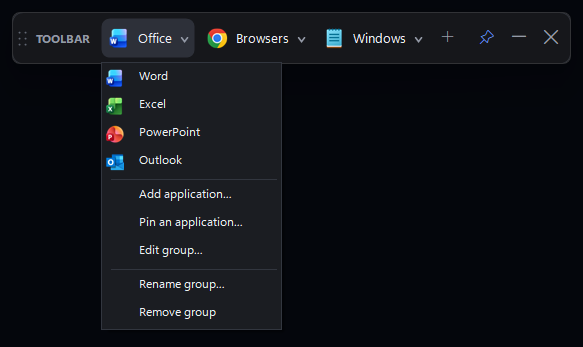
Most launchers want a dock, a start menu or an installer. This one is a strip 52 pixels tall that stays on top of other windows and does nothing until you click: groups that open a list, entries pinned to the bar that launch in one click, and a right-click menu for adding, editing and removing both.
It is a .NET 8 WinForms app with no third-party packages — the bar, its buttons, the dark renderer, the icon loader and the fullscreen detector are all in the repository. Dropping a file, shortcut, folder or URL on the bar adds it as an entry and takes the target's own shell icon; an entry whose target has disappeared reports the failure instead of taking the app down.
Two things make it survive a working day: Ctrl+Alt+Space shows or hides the bar from any application, and an optional auto-hide pulls it out of the way while a fullscreen app has focus, then puts it back when focus returns. Settings are a single JSON file under %APPDATA%, so a whole layout can be copied between machines.
What it does
Groups that drop down
Office, browsers and Windows tools each take one slot on the bar; clicking opens the list, and a group can append the user's own browser favourites as a sub-menu.
Drag to arrange, in both directions
Entries reorder inside an open drop-down and groups reorder along the bar, with a blue insertion line showing where the item will land before you let go.
Drop files from Explorer
Files, shortcuts, folders and URLs dropped on the bar become working buttons carrying the target's own icon; a target that no longer exists shows a message instead of crashing the launch.
Out of the way when it should be
Ctrl+Alt+Space toggles the bar globally, and auto-hide restores it the moment the fullscreen app loses focus.
Small on purpose
One executable, no NuGet packages and no background service: the self-contained single file is the same project published with one extra flag.